Smartphones have transformed photography. What once required bulky cameras and expensive lenses is now possible with a device that fits in your pocket.
The question many ask today is: can you take professional photos with a phone? The answer is yes—with the right techniques and a bit of creativity.



Below, we break down the key techniques and settings that can help you take stunning, high-quality shots.
The Evolution of Smartphone Cameras
The rise of mobile photography is no coincidence. Major brands like Apple, Samsung, and Google have invested heavily in improving camera quality.
According to DXOMARK, many smartphones today outperform entry-level DSLRs in certain conditions.
From night mode and portrait effects to ultra-wide lenses and AI-powered enhancements.
Smartphones are packed with features that make it entirely possible to take professional photos with your iPhone or Android device.
Phones With the Best Cameras
As of April 2025, here are some smartphones renowned for their exceptional camera capabilities:
- Samsung Galaxy S25 Ultra: Features a 200 MP wide sensor, a 50 MP 5x periscope telephoto lens, and advanced AI-driven image processing through Samsung’s ProVisual Engine.
- Apple iPhone 16 Pro Max: Equipped with a 48 MP wide camera, a 5x optical zoom telephoto lens, and enhanced low-light performance, making it a top choice for photography enthusiasts.
- Google Pixel 9 Pro XL: Known for its superior color accuracy and low-light performance, this device leverages Google’s advanced computational photography algorithms to deliver outstanding image quality.
- Xiaomi 15 Ultra: Developed in collaboration with Leica, it boasts a 50 MP primary sensor with optical image stabilization, a 50 MP ultra-wide sensor, and a 50 MP telephoto sensor, catering to versatile photography needs.
- OnePlus 13: Features a 50 MP main camera, a 50 MP zoom lens with 3x optical zoom, and a 50 MP wide-angle lens, offering competitive camera performance that rivals leading brands.
Basic Tips on How to Take Professional Photos with a Smartphone
Whatever you’re using, understanding how to take professional pictures with a phone is less about the device and more about how you use it.
1. Clean Your Lens
This sounds simple, but it’s often overlooked. A dirty lens causes blurry, hazy, or distorted images.
Use a microfiber cloth to clean the lens before taking any photos.
2. Use Gridlines for Composition
Turn on the gridlines in your camera settings.
This helps with the “rule of thirds,” a fundamental principle in photography that suggests placing key subjects off-center for better balance and interest.
- On iPhone: Go to Settings > Camera > Grid.
- On Android: This varies by brand, but typically under Camera Settings > Grid or Composition.
3. Tap to Focus and Adjust Exposure
Most smartphones allow you to tap on the screen to set focus. Once you do, a sun icon or slider will appear—use it to adjust the brightness.
4. Use Natural Light Whenever Possible
Good lighting is essential. Shoot during the golden hour (shortly after sunrise or before sunset) to get warm, soft lighting.
Avoid using flash unless absolutely necessary, as it can create harsh shadows and unnatural tones.
5. Avoid Zooming In
Digital zoom often reduces image quality. Instead of zooming, get closer to your subject or crop the image afterward for better clarity.
6. Stabilize Your Shot
Use both hands to hold the phone steady or consider using a tripod.
This is especially important in low-light settings where the camera uses slower shutter speeds.
Advanced Techniques for More Professional Results
With today’s technology, taking professional photos with smartphone cameras requires good tool use.
1. Shoot in RAW Format
Shooting in RAW retains more image data, giving you greater flexibility when editing.
- On iPhone: Use ProRAW (available on iPhone 12 Pro and newer) via Settings > Camera > Formats > Apple ProRAW.
- On Android: Use apps like Adobe Lightroom or Open Camera that support RAW format.
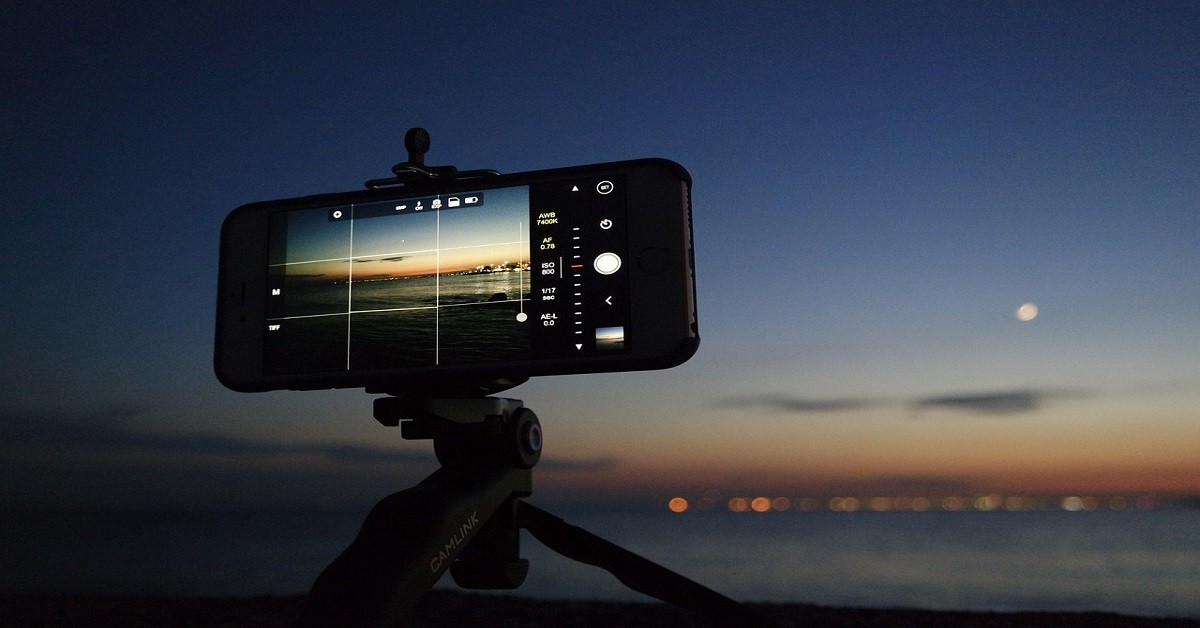
2. Use Manual Mode (Pro Mode)
Some Android phones offer a “Pro” or “Manual” mode, allowing you to control shutter speed, ISO, white balance, and focus manually.
For iPhone users, third-party apps like Halide or ProCamera offer similar control.
3. Leverage Portrait and Night Modes
Portrait mode adds background blur, simulating DSLR-like bokeh. Night mode improves image quality in low-light conditions by stacking multiple exposures.
4. Use a Dedicated Camera App
Default camera apps are optimized for quick use, but apps like Adobe Lightroom Mobile, Camera+, or ProShot give you more control over settings and formats.
How to Take Professional Photos with Android
Here’s how to get started:
- Explore Pro Mode: Samsung, OnePlus, and Xiaomi phones often have this built in.
- Adjust Settings Manually: Control shutter speed for motion blur or freeze, tweak ISO for light sensitivity, and fine-tune white balance for color accuracy.
- Use Google Camera (GCam): GCam enhances image quality with HDR+ and Night Sight features and is available on some Android models.
- Lens Attachments: Add macro, wide-angle, or telephoto lenses using clip-on lens kits designed for Android phones.
Can You Take Professional Photos with an iPhone?
Absolutely. The iPhone camera system, especially on the Pro models, is one of the best on the market.
- Use Apple ProRAW: This feature gives photographers maximum flexibility in post-processing.
- Take Advantage of Smart HDR and Deep Fusion: These technologies enhance details in both shadows and highlights.
- Try Third-Party Camera Apps: Apps like Halide or ProCamera allow fine-tuned control of your shots.
Editing: The Final Step to Professional Quality
Even the best photographers edit their photos. Editing refines your vision and corrects any imperfections.
Recommended Editing Apps:
- Snapseed: This is Free and user-friendly.
- Adobe Lightroom Mobile: Offers RAW support and powerful adjustments.
- VSCO: Ideal for aesthetic presets and filters.
- PicsArt or Afterlight: Great for creative or stylized edits.
Focus on adjusting:
- Brightness and Contrast
- White Balance
- Sharpness and Clarity
- Color Saturation and Hue
Real-World Examples and Use Cases
Consider as models:
- Social Media Influencers: Most Instagram influencers use iPhones or Androids for their content, relying heavily on good lighting and smart editing.
- Journalists and Content Creators: Many rely on smartphones in the field for capturing fast, high-quality visuals.
- Small Businesses: Product photography and marketing content are often created using smartphones, saving on professional photography costs.
Final Thoughts
So, can you take professional photos with a phone? The answer is a confident yes.
Practice good techniques and refine your edits.
The path to professional-quality images is at your fingertips. All it takes is intention, practice, and a little creativity.